

DashClicks Blog
The industry's top experts offer their best advice, research, how-tos, and insights—all in the name of helping you level-up your business and online marketing skills.
Join Us!
.svg)
.svg)
.svg)
.svg)
.svg)

7 Creative Platforms That Make Short-Form Video Marketing More Effective
Short-form video has become one of the most competitive spaces in video marketing, yet most creators and teams are still cobbling together workflows from tools that were never designed to work together. The result is inconsistent output, missed publishing windows, and content that underperforms across TikTok, Instagram Reels, and YouTube Shorts.
The seven platforms covered here each solve a distinct piece of that puzzle. Some lead with template libraries that speed up production, while others specialize in repurposing long-form content, generating accurate captions, building AI-powered video from text, surfacing performance analytics, enabling team collaboration, or streamlining user-generated content workflows. No single platform dominates every use case, which is why the right choice depends heavily on goals, team size, and the specific channel mix a brand is trying to manage as part of its broader content strategy.
For agencies managing short-form video as part of a larger digital marketing strategy, creative production is only one piece of the puzzle. DashClicks also provides white label SEO services that can help strengthen the organic search side of a client's broader content strategy.
Quick Picks for Better Short-Form Video
Before diving into the full breakdown, here is a fast-reference snapshot of all seven platforms and what each one does best:
- Freebeat AI Music Visualizer – Best for music-driven visuals and audio-led short-form campaigns
- Canva – Best for template-based design and high-volume social content
- CapCut – Best for TikTok-native editing, auto-captions, and quick repurposing
- Adobe Express – Best for brand consistency and multi-channel resizing
- InVideo – Best for AI-powered, script-to-video content generation
- Descript – Best for transcript-first editing, captions, and repurposing spoken content
- VEED – Best for browser-based editing, clean captions, and distributed team collaboration
Platform choice is not one-size-fits-all. As the sections below show, the right tool depends on your goals, your team's size, and the specific channels you publish to.
What Makes a Creative Platform Worth Using?
Not every tool that promises faster video production actually delivers results that match platform expectations. The real measure of a creative platform is whether it reduces production time and improves how content performs once it is live.
For short-form video specifically, that means evaluating a handful of decision-relevant criteria before committing to any tool. Vertical video output is the starting point, since TikTok, Instagram Reels, YouTube Shorts, and Facebook Reels all demand a native 9:16 format. From there, caption support, content repurposing capabilities, team collaboration features, and video analytics each play a role in determining whether a platform fits into a real production workflow.
According to marketing statistics tracked by HubSpot, short-form video continues to deliver some of the highest return on investment of any content format, which raises the stakes for choosing tools that align with how platforms actually distribute content. A well-structured short-form content strategy also depends on tools that support consistency across channels, not just speed in isolation. Social media marketing demands both.

Short-form video can generate attention on social platforms, but agencies should also consider how video content supports broader search visibility. DashClicks' SEO services can complement video marketing by helping businesses build the keyword, content, and organic search foundation around their digital presence.
7 Creative Platforms That Improve Results
No single tool is the right fit for every team. The platforms below are evaluated on best use case, workflow fit, and one honest caveat each, so you can match the tool to your actual situation rather than a feature checklist.
1. Freebeat AI Music Visualizer
The Freebeat AI Music Visualizer occupies a specific niche within short-form video production: pairing audio content with dynamic, auto-generated visuals optimized for vertical formats. For creators building music-driven content or branded audio campaigns, it removes a step that typically requires manual motion design work.
This makes it a practical addition for anyone producing content where audio is the primary engagement driver, particularly on TikTok and Reels where sound-on viewing remains high. Teams that want music-led visuals without building motion graphics from scratch will find it fits naturally into a short-form creative workflow.
2. Canva
Canva is best known as a design tool, but its video capabilities have expanded considerably for short-form content. Teams can access thousands of vertical templates sized for TikTok, Instagram Reels, and YouTube Shorts, which shortens the gap between concept and publish-ready asset.
Its main strength is speed. Branded templates, a built-in media library, and simple text animation tools make it a reliable starting point for teams producing high volumes of social content. The limitation is depth: Canva handles design-led video well but falls short for creators who need precise cut editing or advanced motion.
3. CapCut
CapCut is purpose-built for the kind of editing that performs on TikTok and Reels. Its auto-captions feature, trending audio integration, and one-tap effect tools are designed around platform-native content expectations rather than general video production.
For teams repurposing longer content into short clips, CapCut's trimming and template tools make the process faster than most desktop alternatives. The trade-off is that its brand consistency features are limited, which makes it better suited for individual creators than larger marketing teams managing multiple accounts.
4. Adobe Express
Adobe Express fits best into workflows where brand consistency across channels is a priority. Preset brand kits, logo placement, and quick resizing across formats make it a practical choice for teams publishing the same creative across TikTok, Instagram Reels, and YouTube Shorts simultaneously.
It connects directly to Adobe's broader ecosystem, which is an advantage for teams already working in Premiere or Photoshop. That same integration, however, means the learning curve is steeper for creators coming in without prior Adobe experience.
5. InVideo
InVideo's defining feature is its script-to-video capability, where written content is converted into a structured short-form video using AI-powered video generation. This makes it useful for teams scaling content production without a dedicated video editor on staff.
Its template library is extensive, and the AI tools handle scene selection and pacing reasonably well. Where it underperforms is in fine-grained editing control, so it works better as a drafting tool than a final-output solution for high-production content.
6. Descript
Descript approaches video editing from a transcript-first perspective. Editors work from a text document rather than a traditional timeline, which significantly reduces the time spent on cuts, filler removal, and caption generation.
For short-form video, this workflow is particularly efficient when repurposing interviews, podcasts, or talking-head content into clips. Descript's automatic caption accuracy is also notably strong, which supports silent-first viewing habits across most short-form platforms.
7. VEED
VEED operates entirely in the browser, which removes software installation as a barrier for distributed teams or agencies managing multiple clients. Its caption tools are accurate and easy to style, and its collaboration features allow comments and edits without exporting files back and forth.
For teams prioritizing fast turnaround and clean captions over complex visual production, VEED handles the final-mile editing stage efficiently. Its analytical features are limited compared to dedicated video marketing platforms, so it pairs best with a separate analytics tool in the broader workflow.
Match the Tool to the Channel You Publish On
Knowing which tools are available is only half the equation. The other half is understanding which channels those tools serve best, since editing style, caption support, and pacing all need to reflect what actually performs on each platform.
Best Fits for TikTok and Instagram Reels
TikTok and Instagram Reels share a creative culture that rewards fast cuts, strong audio, and native-feeling production. Tools like CapCut and Freebeat AI Music Visualizer align well here because they are designed around the pacing and visual language these platforms favor.
Captions are also non-negotiable on both channels, where a significant portion of viewers watch without sound. CapCut's auto-caption tools and Descript's transcript-based editing both support that expectation without adding friction to the workflow. For teams focused on leveraging TikTok for business growth, the tool selection should prioritize speed, audio integration, and platform-native formatting over advanced editing control.
Best Fits for YouTube Shorts and Facebook Reels
YouTube Shorts rewards content with clearer framing and slightly longer retention arcs compared to TikTok, making tools like InVideo and Adobe Express better fits for structured or repurposed content.
Facebook Reels, on the other hand, tends to perform well with content repurposed from longer formats, which is where Descript's transcript-first workflow adds real efficiency. Teams converting existing video assets into short clips will find that approach faster than rebuilding from scratch. VEED works across both channels when clean captions and quick turnarounds are the priority, particularly for distributed teams managing content across multiple social media marketing accounts simultaneously.

How to Choose the Right Platform for Your Team?
The right platform depends less on feature lists and more on how a team actually operates. Solo creators prioritize speed and simplicity, small in-house teams often need brand consistency across channels, and larger marketing teams managing approval workflows require collaboration features that keep production moving without version control problems.
From there, the decision narrows around what matters most: whether that is AI-powered video generation for scaling content output, video analytics for tracking performance, or lightweight repurposing tools that fit an existing content strategy. The most practical approach is to select one primary creation tool suited to the team's core video production needs, then pair it with one repurposing or caption workflow rather than layering in additional software that complicates the video marketing process without adding proportional value.
For agencies offering multiple digital marketing services, the video creation platform should fit into the wider client workflow rather than operate in isolation. DashClicks helps agencies support that broader strategy with white label SEO services alongside other digital marketing solutions.
Final Takeaway
Effectiveness in short-form video marketing rarely comes from finding the most feature-rich platform. It comes from matching the right tool to the team's actual workflow and the specific channels it publishes to consistently.
For TikTok, Instagram Reels, and YouTube Shorts, the platforms that generate the most value are the ones that reduce production friction without sacrificing output quality. The best creative platform is simply the one a team can use reliably, week after week, to keep video marketing moving forward.
Short-form video works best when it is part of a broader digital strategy rather than a standalone channel. Agencies can combine creative video production with services such as SEO from DashClicks to help clients build both social engagement and long-term organic visibility.

How Agencies Can Use Video Marketing To Land Higher-Ticket Clients in 2026
Most agencies trying to crack the $10K/month tier are still pitching like it's 2019. A deck, three case studies in a PDF, two sales calls, a Calendly link, and a hope. Meanwhile, the prospect has six tabs open, three other agencies in their inbox, and an AI assistant summarizing all of you into a single comparison table.
The pitch motion broke. Most owners haven't noticed yet because the $1-3K retainer business still closes on momentum and referrals. But the moment you try to move that same motion upmarket, the close rate collapses. Bigger budgets mean bigger buying committees, more scrutiny, and longer cycles. Decks don't survive that.
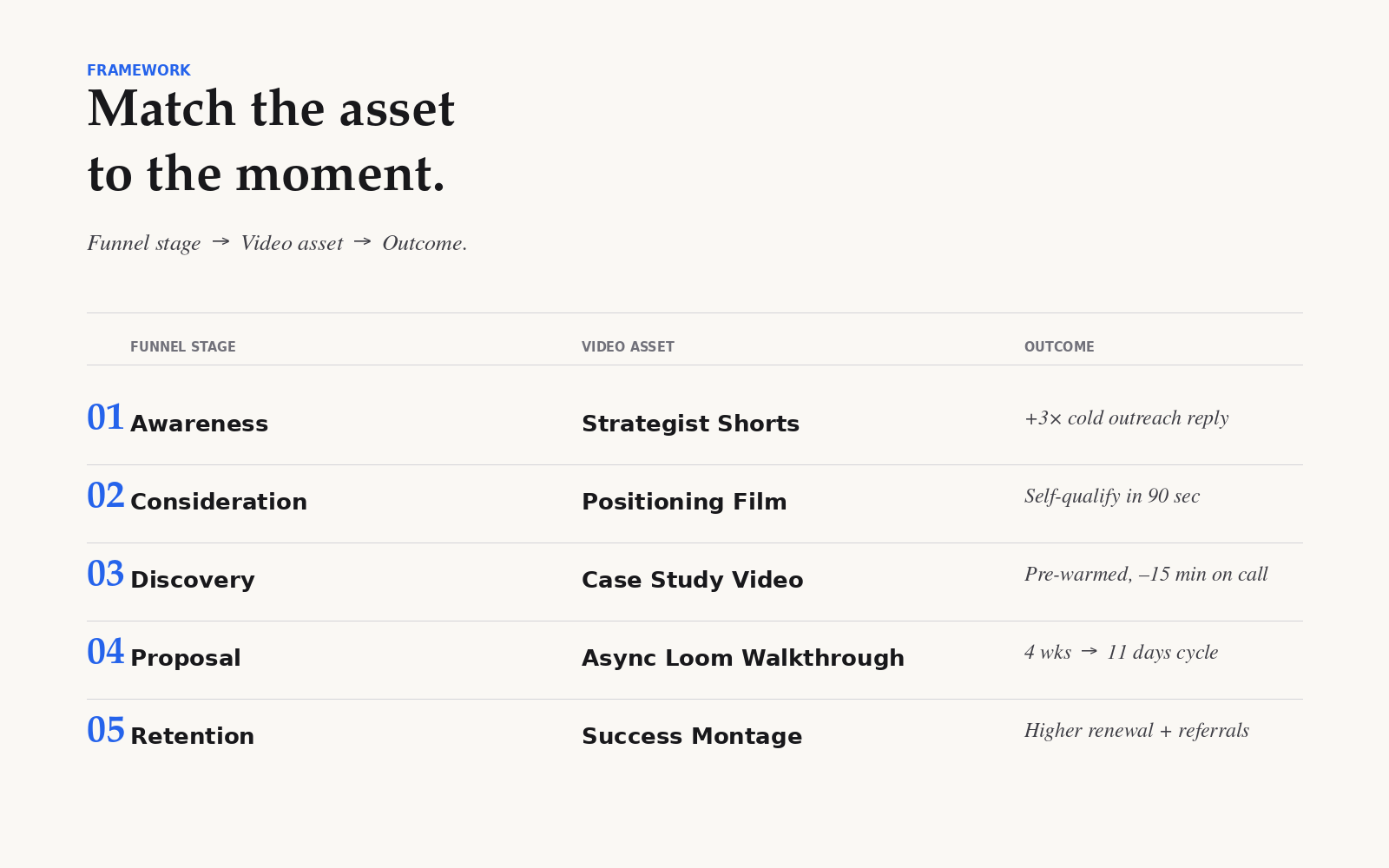
Video does. Not "we should do more video" video. A specific, ordered stack of five assets that compresses trust, demonstrates judgment, and lets a five-person committee pre-sell you to each other while you sleep. That is what changes the unit economics of a six-figure agency relationship.
This is the playbook we use and the one we'd hand any agency owner trying to break out of the $3K ceiling in 2026.
Why Video Maps to Higher-Ticket Sales in 2026?
Four things shifted in the last 18 months, and together they make video the cheapest trust-builder an agency can deploy.
Trust collapsed faster than tooling caught up. Buyers assume your case studies are cherry-picked and your testimonials are friend favors. A 90-second clip of a real strategist explaining a real tradeoff does more for credibility than ten written reviews. You can fake a logo wall. You can't fake the way someone talks about their own work for 90 seconds straight.
AI made everyone sound the same. Every agency website now opens with "we drive growth through data-driven strategy." Every cold email leads with "I noticed you're hiring." Text is commoditized. Video is the last channel where personality still cuts through, which is why the smartest agencies are leaning hard into the B2B video trends shaping 2026 and treating the medium as a moat, not a marketing tactic.
Buying committees got wider. A $10K/month decision now routes through a CMO, a head of growth, a finance lead, and sometimes a founder. You're not in the room for 80% of the conversation. Video is the only asset that scales your pitch into that room without you. A founder forwarding a 3-minute case study video to her CFO is worth more than three live calls.
Attention asymmetry got brutal. A founder will skim your proposal for 90 seconds. She'll watch a well-cut video for 4 minutes. That extra 2.5 minutes is where deals are won.
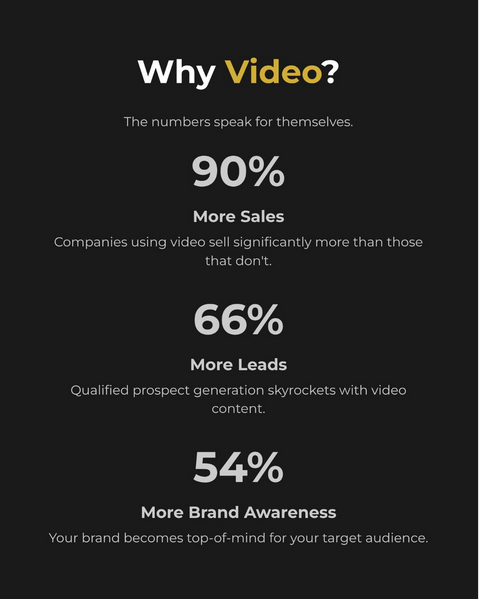
Image Source: Instagram
The 5-Asset Video Stack That Lets Agencies Pitch $10K+ Retainers
This is the stack. Build it in order. Don't skip the fun ones.
1. The 90-Second Positioning Film (Homepage Hero)
What it does: tells a $10K-budget visitor, in under two minutes, who you serve, what you believe, and why you're different. Not a "sizzle reel." A point of view, delivered to camera by the founder or lead strategist.
Length: 75-100 seconds. Anything over two minutes loses the senior buyer.
Lives at: top of the homepage, autoplay muted, with captions baked in.
The best ones name a specific enemy. "We don't do retainers for agencies who measure success in impressions." That kind of line filters out the $2K tire-kickers and pulls in the buyer who's been burned before. Good positioning borrows the rules of strong video storytelling, which means stakes, specificity, and a clear before-after.
2. The Vertical-Specific Case Study Video (Proposals)
What it does: replaces the three-page case study PDF that nobody finishes. A 2-3 minute interview-style cut with the client on camera, B-roll of the actual work, and hard numbers on screen.
Length: 150-180 seconds. One per vertical you sell into.
Lives at: inside proposals, on a dedicated `/work/[client-name]` page, and in cold outreach as a contextual proof point.
Build one for each of your top three verticals. A SaaS prospect doesn't care about your dental client. A dental practice doesn't care about your B2B fintech win. Generic case studies signal that you're generic.
3. The Strategist POV Shorts (LinkedIn-Native)
What it does: builds a personal brand for the senior strategist who closes deals, so prospects show up to the first call already half-sold.
Length: 45-90 seconds, vertical, captioned, hook in the first 1.5 seconds.
Lives at: LinkedIn, primarily. Cross-post to YouTube Shorts and Instagram Reels if you have bandwidth.
The bar for shorts is lower than agencies think. A phone, a clip-on mic, and the right video maker gets you publishable assets in under an hour each. "Why don't most ecommerce brands run TikTok ads in Q1." Not "5 tips for better marketing." Opinions are what justify a senior fee. If you want to go deeper on the long-form side as well, there's a real argument for building out a YouTube channel, but only after the shorts engine is humming.
4. The Proposal Walkthrough (Async Loom Pitch)
This is the one most agencies skip and it's the one that moves the needle most. After the discovery call, instead of booking a second "proposal review" call, you send a 6-12 minute screen-recorded walkthrough of the proposal with you on camera in the corner.
Length: 6-12 minutes. Don't pad it.
Lives at: a Loom or Vidyard link inside the proposal email, with view tracking on.
Why it works: the prospect can forward it to her CFO, watch it twice, and pause to take notes. You also see exactly who watched, for how long, and where they re-watched. That data alone is worth the production cost. We've seen this single asset compress the sales cycle from 4 weeks to 11 days on six-figure deals. For a deeper take on integrating video across the full sales motion, this guide on using video inside a marketing strategy is a solid starting point.
5. The Client Success Montage (Retention and Referrals)
What it does: keeps existing clients sold (so they renew at higher rates) and turns them into referral engines.
Length: 60-90 seconds, produced quarterly.
Lives at: the QBR deck, a private client portal, and the client's own internal Slack when they want to show their boss why the agency line item is justified.
This is the cheapest asset to produce and the one with the highest dollar return. A client who can forward a great quarterly recap video to their CEO is a client who doesn't churn when the CMO turns over.
How to Produce All Five Without Burning $50K?
Here's the lean stack we actually use. Total upfront cost: under $3,000. Ongoing monthly: roughly $1,500-2,000.
Hardware:
- iPhone 15 Pro or 16 Pro (you already own this). Shoots 4K, ProRes, log color. $0 incremental.
- A $120 lavalier mic (DJI Mic 2 or Rode Wireless ME). Audio is 70% of perceived production quality.
- A $90 LED key light. One light, behind the camera, slightly off-axis.
- A $40 tripod. That's it.
Software:
- Riverside or Descript for remote client interviews. Around $24/month. Descript's editing-by-transcript is a cheat code for the proposal walkthroughs and shorts.
- CapCut Pro or Premiere for finishing. $10-20/month.
- Loom or Vidyard for async pitches. $15/month, and the analytics pay for themselves on the first closed deal.
People:
- One freelance editor at $300-500 per finished video. You find these on Twitter, in the Descript community, or in agency Slack groups. Avoid Fiverr for anything client-facing.
- A part-time producer/scheduler (5-8 hours a week) if you're producing shorts at volume. $400-600/month.
That's the whole rig. The 90-second positioning film, done once and updated annually, runs $800-1,500 if you outsource the cut. Case study videos, $400-600 each. Shorts, $50-100 per finished asset once you have the workflow dialed.
Compare that to the $20-50K agencies used to spend on a "brand video" project, and the math gets interesting fast. If you want to scale further without hiring in-house, white label fulfillment is a reasonable way to handle the editing layer once your volume goes past 8-10 finished videos a month, and it keeps your agency margins intact while you scale output.
Where to Deploy Across the Funnel?
Building the assets is half the work. The other half is putting them in the right place at the right moment.
- Top of funnel: Strategist POV shorts on LinkedIn. Positioning film on the homepage. Run the shorts as paid retargeting against website visitors for around $300-500/month.
- Cold outreach: Embed a 30-second personalized Loom inside the first email. Not the case study, not the pitch. Just a strategist talking about something specific to that prospect's business. Reply rates roughly 3x in our testing.
- Discovery call: Send the vertical-specific case study video the day before, as homework. Prospects show up warmer and you skip 15 minutes of "tell me about your other clients."
- Proposal: Send the async walkthrough instead of booking a second call. Use the view-tracking to time your follow-up.
- Retention: Quarterly success montage delivered alongside the QBR. Reference it in renewal conversations.
- Referral: When a client says "this was great," ask for a 60-second testimonial recorded on their phone. Edit it into the next case study cycle.
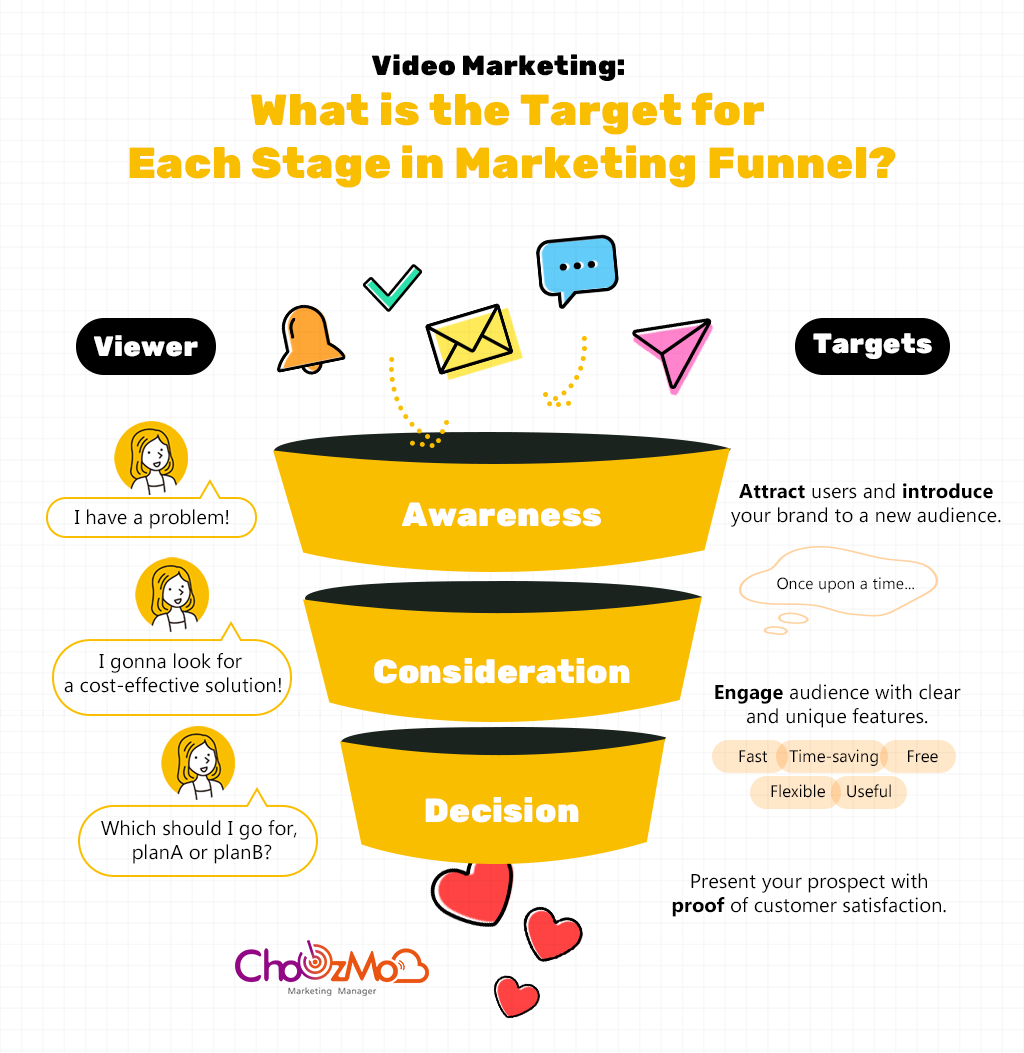
Image Source: Imgur
Turning Video Engagement Into Revenue
Creating video assets is only part of the equation. The agencies seeing the biggest returns are the ones that connect video marketing to a repeatable client acquisition system.
A prospect who watches your positioning film, engages with your LinkedIn content, or spends ten minutes reviewing a proposal walkthrough is signaling intent. The challenge is tracking those signals and turning them into meaningful sales conversations before they go cold.
This is where agency growth platforms like DashClicks can help streamline the process. Rather than managing leads, follow-ups, reporting, and fulfillment across multiple disconnected tools, agencies can centralize their marketing and sales operations in one place. When video becomes part of a larger lead-generation strategy, it becomes easier to identify engaged prospects, nurture opportunities through the pipeline, and maintain consistent communication throughout longer sales cycles.
The highest-performing agencies in 2026 aren't relying on video alone to close deals. They're combining trust-building content with systems that capture, organize, and convert buyer interest at scale. Video creates attention, but the right marketing infrastructure ensures that attention turns into signed contracts and long-term client relationships.
Measuring ROI, with Actual Math
Track four numbers. Everything else is vanity.
- Proposal-to-close rate. Baseline it before you deploy the async walkthrough, then measure 90 days after.
- Average contract value (ACV). Video gives you the confidence to quote higher. Watch this number move.
- Sales cycle length. First call to sign a contract. Async pitch typically cuts this 30-50%.
- Cost per finished video asset. Keep this honest so you know what's actually scaling.
Here's the math that matters. Say you're running a five-deal-a-month pipeline at an $8K ACV, closing 18% of proposals. That's roughly $7,200/month in the new MRR.
Add the video stack. Close rate moves to 27% (we've seen 30%+ at agencies with disciplined async pitches). Same pipeline, same ACV. New MRR: $10,800/month. That's $3,600/month in incremental revenue from the same lead flow, or about $43K in annualized recurring contract value.
Now layer in the ACV lift. Confident positioning and a better pitch motion typically move ACV 20-40%. Take the conservative end. $8K becomes $9,600. Run the same math: 5 deals x 27% x $9,600 = $13,000/month in new MRR. That's $70K+ in incremental annualized revenue against a video stack that costs you maybe $25K/year fully loaded.
If you're not sure where to peg your new rates, this agency pricing guide is a useful sanity check before you re-quote your next proposal.
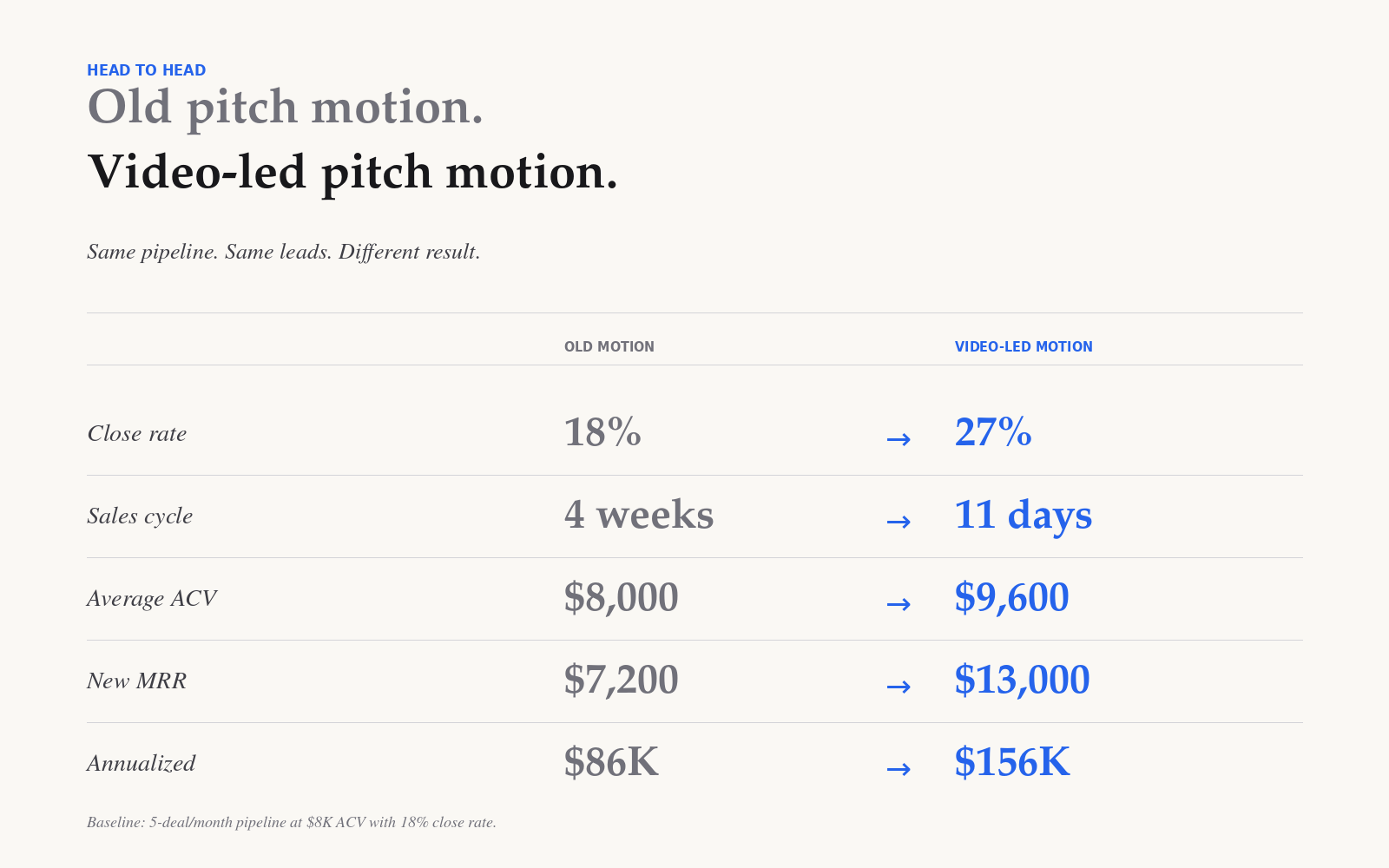
That is the unit economics shift. Not a marginal lift. A category change in what your agency is worth.
The Real Takeaway
The agencies winning $10K+ deals in 2026 are not necessarily better strategists than the ones stuck at $2K. They are better packaged ones. They've figured out that a senior buyer's trust is bought in 90-second increments, that async beats synchronously in a five-person committee, and that the cost of building this stack is small enough that not building it is the more expensive choice.
If you're sitting on a roster of $1-3K clients wondering why the bigger ones keep ghosting after the second call, the answer is almost never the strategy. It's the pitch motion. Fix the motion. The deals follow.


Scaling Client Growth Through Strategic Podcast Marketing
Podcasting gets judged by download charts, yet that number rarely explains whether revenue moved. A show can sound successful and still produce zero qualified conversations.
Client acquisition is the outcome that matters, especially for service firms with long sales cycles. When teams focus on listeners alone, they miss the signals that actually predict deals. A podcast earns attention differently than a post someone skims between meetings. Listeners often spend enough time with a host to pick up judgment, values, and how problems get framed.
That extended listening time can build trust faster than most written content, even when the topic is complex. Strategic podcast marketing works best when each episode sounds like a real working session, not a pitch.
Why Podcasts Drive Client Acquisition (Not Just Downloads)?
For a B2B podcast, relationship building becomes part of the format. Inviting operators and decision-makers onto the show creates a reason to talk, then follow up with context that feels natural.
This is where thoughtful podcast promotion supports lead generation, because the right distribution puts episodes in front of people who can buy or refer. Audience growth matters, but only when it improves fit, not vanity.
Niche positioning is the filter that makes the whole channel compound. As the show gets clearer about who it serves and what it solves, fewer episodes attract more of the right conversations.
Teams can then measure performance by replies, introductions, and meeting requests tied to topics. A single ideal listener who returns every week can outperform hundreds of casual downloads long after the episode ends.
Designing Episodes That Trigger Client Conversations
Not every episode format attracts the same level of buyer intent. Some conversations build awareness, while others create moments where listeners recognize their own challenges and consider taking action.
Service firms benefit from structuring episodes around problems that sit close to real purchasing decisions. Instead of broad industry commentary, episodes should explore questions clients already ask during discovery calls, vendor comparisons, or internal planning.
A few formats tend to create stronger conversion signals:
- Problem-Solution Breakdowns: Episodes that unpack a specific operational challenge help listeners diagnose their own situation and see where external help may fit.
- Case-Style Discussions: Walking through how a company approached a decision, implemented a strategy, or corrected a mistake often prompts listeners to evaluate whether they need similar support.
- Framework or Methodology Episodes: When a host explains how they think about solving a category of problem, it gives listeners language to reference later when reaching out.
- Decision-Stage Conversations: Topics like budgeting, timelines, risks, or vendor selection naturally attract audiences who are closer to buying.
Structuring episodes around these intent-heavy themes helps podcasts generate signals beyond downloads. Listeners begin to reference specific ideas, share episodes internally, or reach out with context already in place, making follow-up conversations more productive.
When this structure is intentional, promotion becomes easier because every repurposed asset points back to a clearly defined client problem rather than general thought leadership.
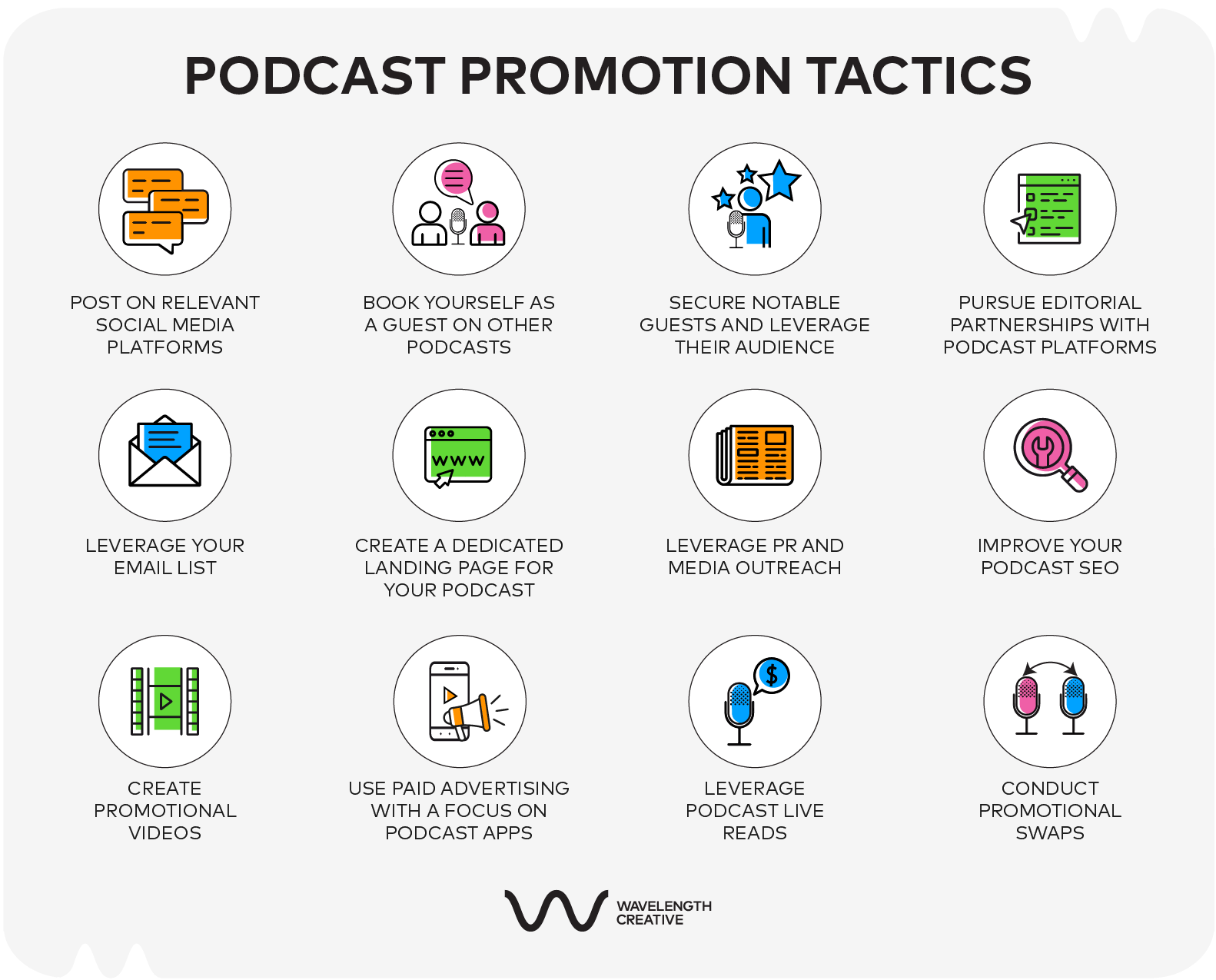
Image Source: Wavelength Creative
Repurposing Episodes Into Multi-Channel Lead Engines
Turning a single episode into multiple assets extends its reach and multiplies opportunities for client acquisition. The sections below break down which formats convert and where to distribute them.
Teams handling distribution at scale often rely on centralized marketing platforms to keep repurposed assets organized, scheduled, and measurable. Platforms like DashClicks can help agencies manage podcast clips, landing pages, email follow-ups, and reporting in one place, reducing the operational load of turning episodes into lead-generating assets.
1. Content Formats That Actually Convert
Instead of treating an episode as a one-time publish, plan content repurposing while recording. Mark timestamped moments where a guest defines a problem, explains a decision, or shares a framework, because those segments travel well.
Turn each episode into a small set of assets:
- Audiograms with a single takeaway and captions
- Short video clips formatted for vertical and square feeds
- A blog post that expands the core argument and links to related content marketing strategies that drive growth
- LinkedIn carousels that summarize a process in slides
Match every asset to one intent: awareness, consideration, or follow-up. When a format supports one intent, it becomes easier to measure which topics create replies and meetings.
2. Platform-Specific Distribution That Reaches Decision Makers
Discovery depends on where decision-makers search and scroll. Podcast SEO matters inside Apple Podcasts and Spotify, so use specific episode titles, consistent show descriptions, and clean tags that mirror how clients describe their problems.
LinkedIn typically performs best for B2B distribution because posts can reach the network of a guest, their colleagues, and second-degree connections. Pair a clip or carousel with a short context paragraph and a question that invites informed comments.
YouTube works like a search engine for long-form ideas, so publish full episodes and cut chaptered highlights with clear titles. Add a description that repeats the key phrase naturally and points to a single next resource.
To build an email list, create an episode-specific lead magnet, such as a checklist, template, or briefing note tied to the topic. Mention it in the show notes and link it from every repurposed asset so attribution stays clear for teams.
Agencies running podcast campaigns across multiple channels often use platforms such as DashClicks to connect social posting, landing pages, and lead capture workflows. This keeps attribution clearer and ensures that engagement from podcast content feeds directly into the sales pipeline.
Collaborations and Cross-Promotions That Scale Reach
Collaborations work best when they are built to generate qualified conversations, not to chase exposure. Podcast guesting can act like a warm introduction at scale, because listeners hear how a guest thinks through a real client problem.
Strong cross-promotions come from complementary podcasts that share an audience but do not compete on the same offer. When both hosts agree on one shared theme, the exchange feels editorial, and community engagement in replies and comments keeps the discussion visible after release.
A quick thank-you note and a shared comment plan help each side stay present without turning the exchange into advertising.
Guest Promo Packs That Make Sharing Easy
A guest promo pack removes friction so partners actually share. Teams can standardize the process by confirming the episode angle, preferred links, and a short bio before recording. Then, deliver the promo pack as soon as the edit is approved, with clear file names and platform notes. Finally, ask each guest to choose one posting window and one follow-up interaction, such as answering questions.
Include assets that make posting almost copy and paste:
- Two pre-written social posts for LinkedIn and X
- Audiograms with burned-in captions
- Quote graphics sized for feeds and stories
- Suggested hashtags tied to the episode topic
- A newsletter snippet with subject line
When sharing takes minutes, guests promote more than once, and those repeated mentions compound across networks and newsletters.
When Paid Ads Make Sense for Listener Acquisition?
Paid ads tend to improve listener acquisition only after a show proves it can hold attention organically. Teams should first see consistent engagement, steady downloads per episode, and repeatable topics that earn shares without paid support.
When that baseline exists, targeting matters more than reach. Ads usually perform best when they mirror existing intent, such as people who follow similar podcasts or engage with creators in the same niche. Campaigns also get cleaner when they focus on one segment at a time, then compare results. That testing mindset keeps the work aligned with a podcast growth strategy built on fit.
Paid social is typically strongest when it pushes one high-value episode rather than the whole show. Promote episodes that solve a narrow problem, feature a known operator, or include a framework that can be summarized in the ad creative.
Budgeting should assume experimentation, not instant scale, because costs vary by platform, targeting, and creative. Industry context from IAB podcast advertising research can explain shifting competition, and teams planning operations may relate this to scaling your agency without hiring over time.
Measuring What Matters: KPIs for Client Growth
Downloads per episode provide a baseline for reach, but they rarely predict revenue. A flatter trend can still produce better clients if the topics match real buying intent and follow-up stays consistent.
Attribution needs to be simple and repeatable. Teams can track podcast-driven inquiries with unique URLs in show notes and bios, episode-specific promo codes, and a required "How did you hear about us?" field in forms.
Lead generation metrics should map to the sales process, not the audio file. Useful signals include email signups tied to an episode, discovery calls booked from the show notes, and the close rate of those calls compared with other channels.
For ROI, calculate total podcast marketing cost per period, then compare it with gross profit from clients sourced through tracked attribution. When sales cycles run long, teams can model ROI using pipeline value and stage conversion rates. This keeps reporting tied to growth.
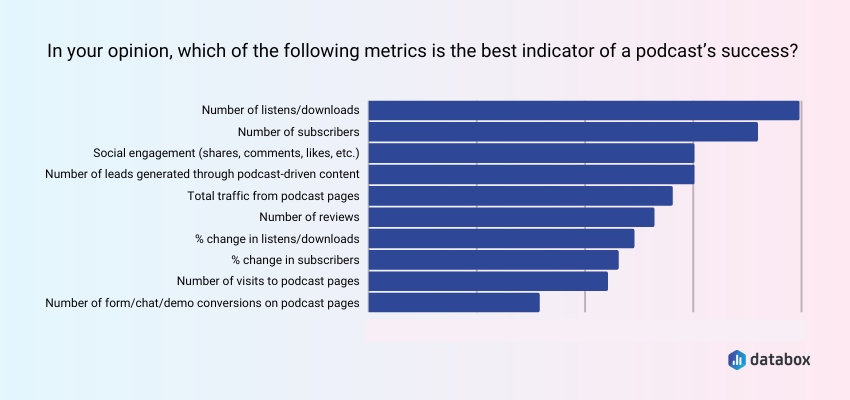
Image Source: Databox
A marketing dashboard can simplify podcast attribution when multiple channels are involved. Platforms like DashClicks allow teams to track leads, monitor campaign performance, and connect podcast-driven inquiries to broader marketing activity without building custom reporting systems.
Turning Listeners Into Clients
Podcasting drives revenue when teams treat it as a client growth system, not a content hobby measured by downloads. Episodes should earn trust, create follow-up reasons, and connect to measurable inquiry paths while staying aligned with current podcasting trends.
Consistency in publishing, paired with disciplined promotion, compounds over time. A practical podcast growth strategy starts small: pick one distribution channel, one repurposed format, and one KPI such as qualified replies or booked calls.
Review results monthly, then double down on topics and placements that attract decision-makers. With that feedback loop, podcast marketing becomes a repeatable pipeline input rather than a weekly creative exercise for service firms.


AI-Generated Content 101 for Marketers and Creators
Video dominates every social media platform. TikTok built an empire on short-form video. Instagram pivoted entirely toward Reels. LinkedIn rewards video content with dramatically higher reach. YouTube Shorts competes for attention spans measured in seconds.
The message is clear: everyone needs to become video-first. The problem is that traditional video production requires skills most people do not have, software most people cannot afford, and time most people cannot spare.
This gap between video demand and creation capability explains the explosive growth of AI video makers. Tools like AI video maker platforms now handle everything from research and scripting to motion graphics and voiceover in unified workflows. What previously required hiring videographers, editors, voice actors, and motion designers now happens inside single applications.
The technology has matured beyond novelty into genuine utility. Creators, marketers, and businesses produce professional-quality video content without learning costly tools, without recording in studios, and without waiting weeks for editor deliveries.
This guide explores how AI video makers work, what separates excellent tools from mediocre ones, and how to leverage this technology for your content strategy.
Why Video Content Matters More Than Ever?
Understanding the strategic importance of video explains why AI creation tools have become essential rather than optional.
1. Platform Algorithm Reality
Every major social platform now prioritises video in its algorithm. This is not speculation or marketing talk. It is an observable reality confirmed by platform executives, creator analytics, and engagement data across millions of posts.
Video content generates longer session times. Platforms monetise attention. Therefore, platforms reward content that holds attention. Video holds attention better than images or text. The logic chain is simple, and the implications are significant.
Creators and businesses who resist video find their reach declining regardless of content quality. Those who embrace video find algorithmic amplification that dramatically extends organic reach. The platforms have chosen sides, and video won.
2. Engagement Multipliers
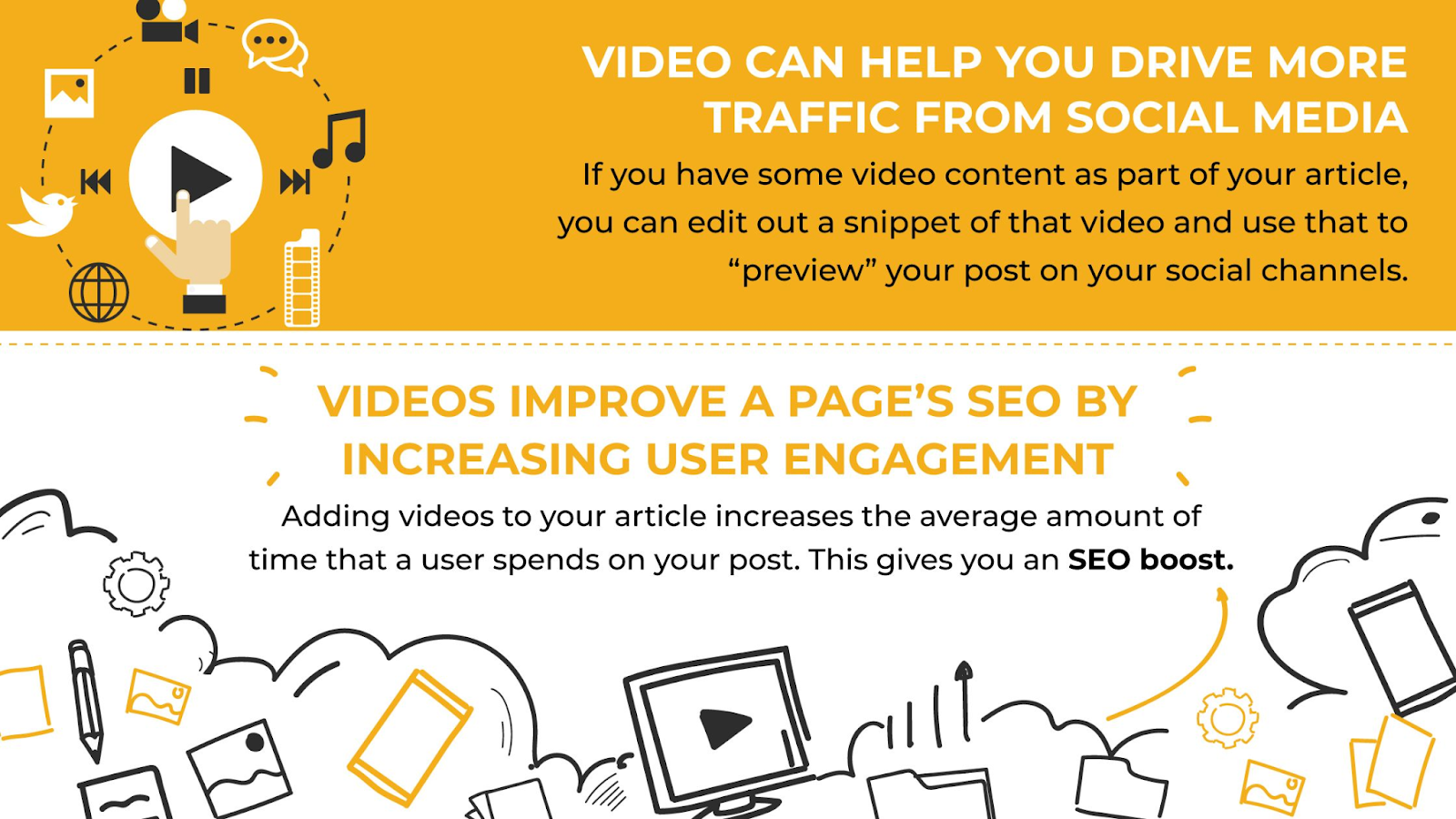
Beyond algorithmic preference, video drives engagement metrics that matter for business outcomes. Watch time, comments, shares, and saves all skew heavily toward video content compared to static alternatives.
These engagement signals compound. Higher engagement triggers more distribution. More distribution creates more engagement opportunities. The flywheel effect makes video content increasingly valuable over time as audience relationships deepen.
Creating engaging video content is only the first step. To maximise visibility across search and paid channels, many businesses partner with platforms like DashClicks that provide white label services to extend the reach of video-first campaigns.
3. Information Density
Video communicates more effectively than text for many message types. Product demonstrations show rather than tell. Explainer content guides viewers through complex concepts visually. Testimonials convey authenticity through facial expressions and vocal tone that text cannot capture.
This communication efficiency matters in attention-scarce environments. Fifteen seconds of video can convey what might require paragraphs of text and multiple images. The format compresses information without sacrificing comprehension.
4. Trust and Connection
Video creates parasocial relationships that other formats struggle to match. Audiences feel they know video creators. This perceived relationship translates into trust that influences purchasing decisions, content sharing, and long-term audience loyalty.
For businesses building brand affinity and creators building audiences, video provides relationship-building capabilities that static content cannot replicate.
The Traditional Video Production Problem
If video matters this much, why isn't everyone creating it? The traditional production process explains the gap.
1. Skill Requirements
Professional video requires multiple specialised skills. Writing compelling scripts differs from general copywriting. Operating cameras and lighting requires technical knowledge. Editing footage demands software proficiency and aesthetic judgment. Motion graphics need design expertise and animation software mastery.
Few individuals possess all these skills. Fewer still have time to develop them while running businesses or creating other content. The skill barrier keeps many capable communicators locked out of video formats.
2. Time Investment
Even with skills, video production consumes enormous time. A polished 60-second video might require hours of scripting, filming, editing, and revisions. Multiply this across the content volume modern platforms reward, and video production becomes a full-time job.
Creators face impossible trade-offs. Invest time in video production and neglect other business activities. Maintain other activities and watch competitors dominate video formats. Neither option serves long-term success.
3. Cost Barriers
Outsourcing video production solves time problems but creates cost problems. Professional videographers, editors, and motion designers charge rates reflecting their expertise. A single professional video might cost hundreds or thousands of dollars.
These economics make video feasible for major campaigns but impractical for the consistent content volume that builds audiences. Sporadic video presence fails to capture algorithmic benefits that reward consistency.
4. Equipment and Software
Professional results traditionally required professional tools. Cameras, lighting, microphones, and editing software represented significant investments before creating a single frame. Subscription costs for software alone might exceed budgets for small creators and businesses.
This equipment barrier reinforced the perception that quality video remained reserved for those with substantial resources.
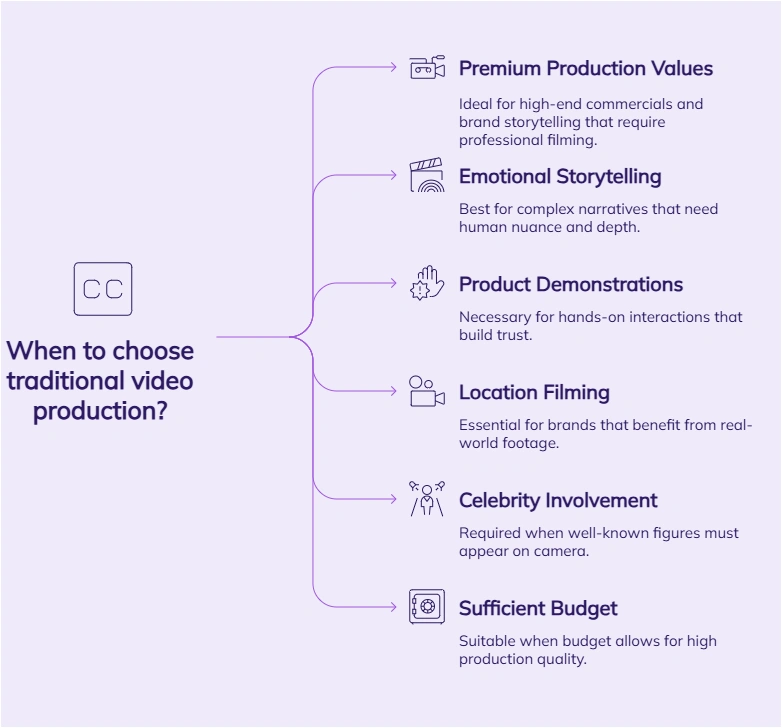
Image Source: Zebracat
How AI Video Makers Change Everything?
AI video makers attack every traditional barrier simultaneously. The technology combines multiple capabilities into unified workflows that transform video production economics.
1. End-to-End Creation
The most significant advancement is workflow consolidation. Rather than using separate tools for scripting, asset gathering, editing, voiceover, and motion graphics, AI video makers handle everything in a single application.
Agent Opus exemplifies this approach as the first AI video agent built specifically for social media. The platform functions as your personal creative squad inside one app. Research, script, motion graphics, avatar, voiceover, and editing all happen in one flow.
This consolidation eliminates the coordination overhead that fragments traditional production. No more moving projects between applications. No more managing handoffs between specialists. No more version control chaos across multiple tools.
2. Automated Specialisation
Each traditional production role becomes an automated capability within AI video makers.
- Researcher: AI tools gather relevant information, statistics, and context for your video topics. No more hours spent researching before writing begins.
- Scriptwriter: Natural language models generate scripts from prompts, outlines, or source content. To make AI-generated scripts feel more authentic and engaging, many creators use an AI humanizer to refine tone, improve flow, and ensure the final narration sounds natural to viewers rather than overly automated. Transform blog posts, articles, or brief descriptions into structured video narratives. Since these scripts start as AI-generated text, running them through a tool to humanize AI-generated text before voiceover recording can help the narration sound less robotic.
- Storyboard Artist: The AI visualises scripts as scene sequences, determining what visuals accompany which narrative moments.
- Asset Manager: Rather than hunting through stock libraries, AI tools automatically source real-world images, news clips, social posts, and footage that fit your video storytelling. Turn the whole web into your media library without multiple stock subscriptions or endless B-roll hunts.
- Hook Designer: Opening moments determine whether viewers stay or scroll. AI optimises hooks for attention capture in platform-specific ways.
- Motion Designer: Say goodbye to After Effects and AI motion slop. Quality AI video makers blend real-world assets with AI motion to create graphics that feel credible and look stylish.
- Video Editor. Assembly, pacing, transitions, and timing happen automatically based on content type and platform requirements.
- Voice Actor: AI voice generation or cloning provides professional narration without recording sessions, retakes, or audio engineering.
3. Avatar and Personal Branding
Your face and voice are your biggest brand. AI video makers now create lifelike AI avatars that look and sound like you, automatically fitting them into appropriate parts of your video.
This capability enables personal brand building through video without requiring constant on-camera presence. Create thought leadership content, commentary, and promotional videos featuring your likeness without filming every piece individually.
For creators uncomfortable on camera or businesses wanting a consistent spokesperson presence across high content volumes, avatar capabilities unlock video formats previously impractical.
4. Speed That Matches Thought
The traditional production timeline, measured in days or weeks, contracts to minutes. End-to-end AI video creation happens at the speed of thought. Concepts become finished videos in single sessions rather than multi-week projects.
This speed transforms what video content is possible. Respond to trends while they are trending. Create timely commentary on breaking developments. Produce content volumes that build algorithmic momentum. The velocity ceiling lifts entirely.
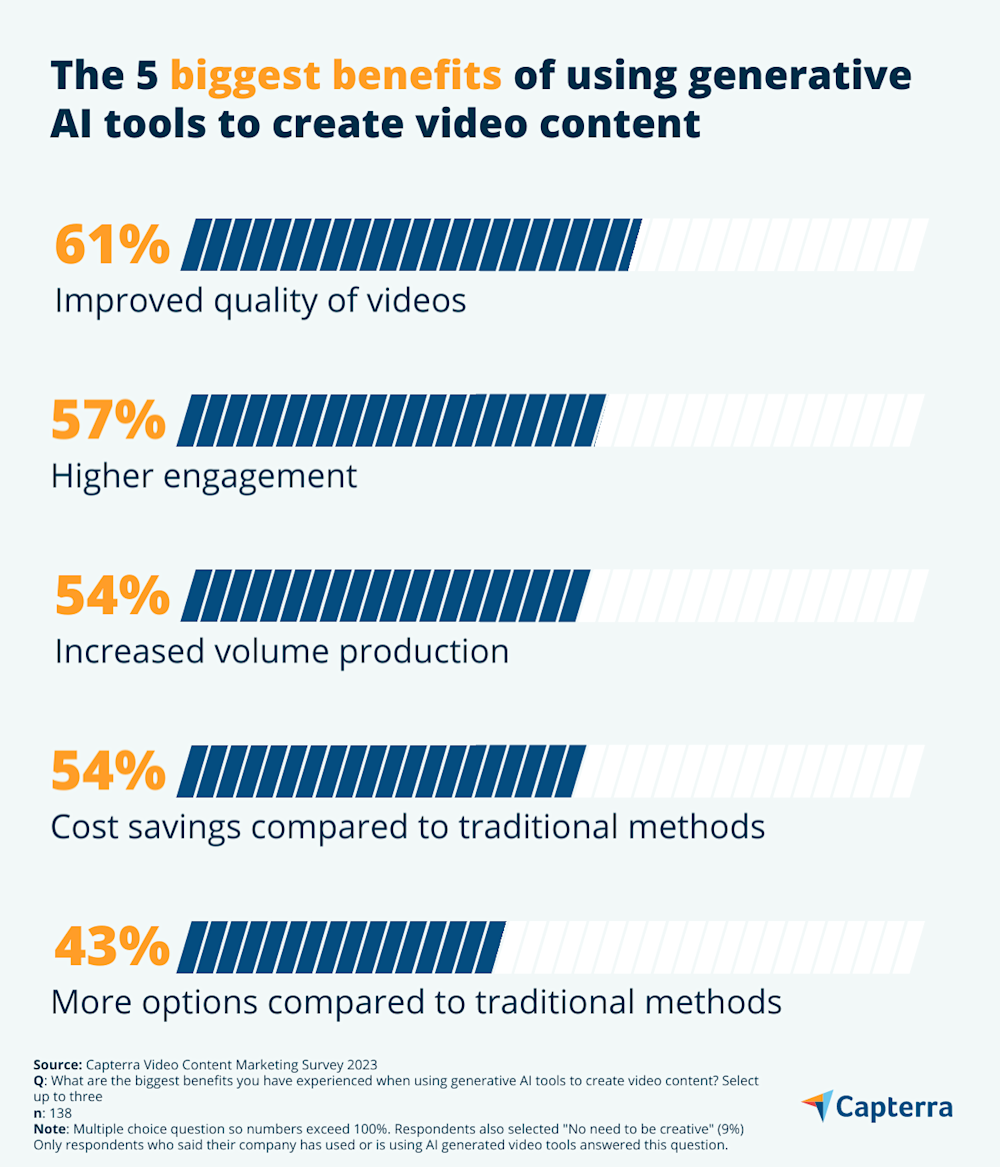
Image Source: Capterra
Types of Videos AI Makers Excel At
Understanding optimal use cases helps you identify opportunities within your content strategy.
1. Explainer Videos
Complex products, services, or concepts benefit enormously from video explanation. AI tools transform technical information into visual narratives that audiences actually understand and remember.
Product features become demonstrations. Service processes become animated walkthroughs. Abstract concepts become concrete visualisations. The format converts confusion into clarity.
2. News and Entertainment
Current events, industry developments, and trending topics translate effectively into video commentary. AI speed enables publishing while topics remain relevant, rather than missing windows waiting for traditional production.
News-style content builds audience expectations for consistent updates. The content rhythm that platforms reward becomes achievable when production timelines compress from days to minutes.
3. Faceless Content
Not everyone wants to appear on camera. AI video makers enable faceless content strategies through motion graphics, stock footage, and visual marketing that never requires filming yourself.
This approach suits creators prioritising privacy, businesses wanting brand-focused rather than personality-focused content, and anyone uncomfortable with on-camera presence. Video benefits become accessible regardless of filming preferences.
4. Thought Leadership
Professional expertise translates effectively into video format. Industry insights, professional advice, and expert commentary all perform well as video content on platforms like LinkedIn and YouTube.
AI tools enable consistent thought leadership publishing that builds professional reputation over time. The content volume required for audience building becomes feasible when production barriers disappear.
5. Commentary and Reaction
Responding to other content, industry events, or cultural moments drives engagement through relevance and timeliness. AI speed makes commentary practical within windows that matter.
Rather than planning commentary content weeks ahead, create it in response to what happened today. This responsiveness builds a reputation for timely, relevant perspectives.
6. Promotional Videos
Product launches, service announcements, and promotional campaigns benefit from video engagement. AI tools make promotional videos feasible for every launch rather than reserving video for major campaigns.
The economics shift from "can we afford video for this?" to "why would we not include video?" when production costs approach zero, and timelines compress to minutes.
Choosing the Right AI Video Maker
Not all tools deliver equal value. Evaluating options against key criteria helps identify the right fit for your needs.
1. Output Quality
Generated videos must meet the quality standards your audience expects. Evaluate actual output rather than marketing claims. Request samples. Generate test videos. Assess whether quality matches professional alternatives.
Quality encompasses visual polish, audio clarity, pacing, and overall production feel. Amateur-looking output damages brand perception regardless of how efficiently it was created.
2. Workflow Integration
How the tool fits your existing processes matters. Some creators prefer starting from scripts. Others want to transform existing content like blog posts or articles. Some need integration with other tools in their stack.
Evaluate the input flexibility and output options each tool provides. The best technical capabilities matter little if workflow friction prevents consistent use.
3. Platform Optimisation
Different platforms have different requirements and audience expectations. Vertical video dominates mobile platforms. Aspect ratios vary. Length preferences differ. Style and tone expectations change across LinkedIn, TikTok, YouTube, and Instagram.
Tools that optimise for platform-specific requirements produce better results than one-size-fits-all approaches. Evaluate how well each option handles your priority platforms.
4. Brand Customisation
Your videos should look like your videos. Evaluate how tools handle brand colours, fonts, logos, and visual identity. Consistent branding across content builds recognition that generic styling cannot achieve.
Avatar quality matters if you plan to use that capability. Realistic avatars that actually look and sound like you differ significantly from obviously artificial alternatives.
5. Iteration Capability
First outputs rarely represent the best outputs. The ability to refine, adjust, and iterate matters for achieving optimal results. Evaluate how easily you can modify generated content and how quickly iterations happen.
Tools enabling rapid experimentation produce better outcomes than those locking you into first attempts.
Getting Started with AI Video Creation
Beginning your AI video journey requires minimal complexity. Start simple and expand as you develop familiarity.
- Start with One Content Type: Rather than attempting every video format immediately, choose one type that fits your current strategy. Explainers for your product. Commentary for your industry. Promotional content for your services. Mastering one format builds skills transferable to others. Trying everything simultaneously spreads attention too thin for meaningful learning.
- Establish Brand Parameters: Before generating volumes of content, define your brand standards within the tool. Upload logos, specify colours, and establish voice and tone preferences. This upfront investment ensures consistency across everything you create subsequently.
- Create a Testing Rhythm: Generate content, publish, measure results, and iterate. This feedback loop reveals what resonates with your specific audience. Platform analytics show what works. Generate more of what performs and less of what does not.
- Scale What Works: Once you identify effective formats and approaches, scale production. AI efficiency makes high-volume creation practical. Use that capability to build content libraries and publishing consistency that compound over time.
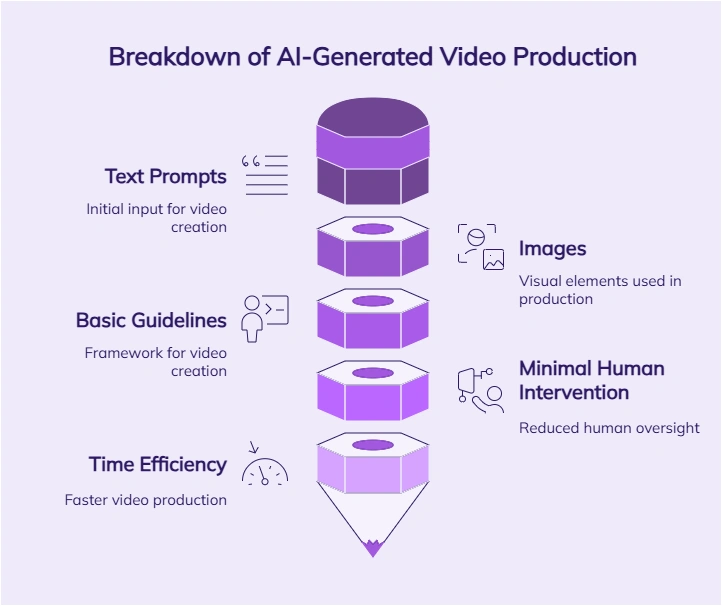
Image Source: Zebracat
As video output scales, marketing operations must scale alongside it. Platforms such as DashClicks help agencies manage campaign automation, reporting, and client delivery when video content becomes part of broader multi-channel strategies.
The Future Is Video-First
The platforms have decided. Audiences have voted with their attention. Video content wins the engagement competition across every channel that matters.
The only question remaining is whether you participate in video or cede that ground to competitors who do. AI video makers remove every traditional barrier. Skill requirements disappear. Time investments collapse. Cost barriers vanish. Equipment needs evaporate.
Everyone will be video-first. The technology ensures that the future exists today, accessible to anyone willing to use it. What's stopping you?
Start creating. Start publishing. Start building the video presence that modern platforms reward. Your audience is watching video content right now. Make sure some of it is yours.

How SaaS Startups Can Scale Operations Without Expanding Headcount
Every SaaS founder hits the same wall. Revenue is growing, customers are signing up, and the product is gaining traction. But behind the scenes, the team is drowning in operational tasks that pull focus away from what actually drives growth.
The instinct is to hire more full time employees. But for early stage and growth stage SaaS companies, expanding headcount too quickly creates financial strain and organizational complexity that can derail momentum.
There is a smarter path forward. This guide explores how SaaS startups can scale operations efficiently by leveraging strategic delegation, optimizing workflows, and building lean teams that punch above their weight.
The Hidden Cost of Doing Everything In House
SaaS founders and their core teams often wear multiple hats during the early stages. The developer handles customer support tickets between coding sprints. The marketing lead manages social media while running paid campaigns. The founder answers sales calls while trying to close funding rounds.
This hustle mentality works temporarily. But it becomes unsustainable as the company grows. Tasks that once took a few hours each week multiply into full time responsibilities that nobody has bandwidth to handle properly.
The real cost is not just burnout. It is opportunity cost. Every hour your senior developer spends on administrative work is an hour not spent improving the product. Every moment your marketing lead dedicates to scheduling social posts is time stolen from campaign strategy and optimization.
Research shows that SaaS companies with higher operational efficiency achieve faster growth rates and better unit economics. The companies that scale successfully learn to protect their core team's focus by delegating tasks that do not require their specialized expertise.
Identifying Tasks That Drain Your Team's Productivity
Before you can solve the problem, you need to understand where time is actually going. Most SaaS teams underestimate how much of their week disappears into low leverage activities.
Start by auditing your team's workload for two weeks. Track every task and categorize them into three buckets. Core activities directly contribute to product development, customer acquisition, or revenue generation. Support activities enable core work but do not require specialized skills. Administrative activities keep the business running but could be handled by anyone with proper training.
Common time drains for SaaS teams include email management and inbox organization, calendar scheduling and meeting coordination, data entry and CRM updates, basic customer support inquiries, social media posting and community monitoring, research and competitive analysis, invoice processing and expense tracking, and recruitment screening and interview scheduling.
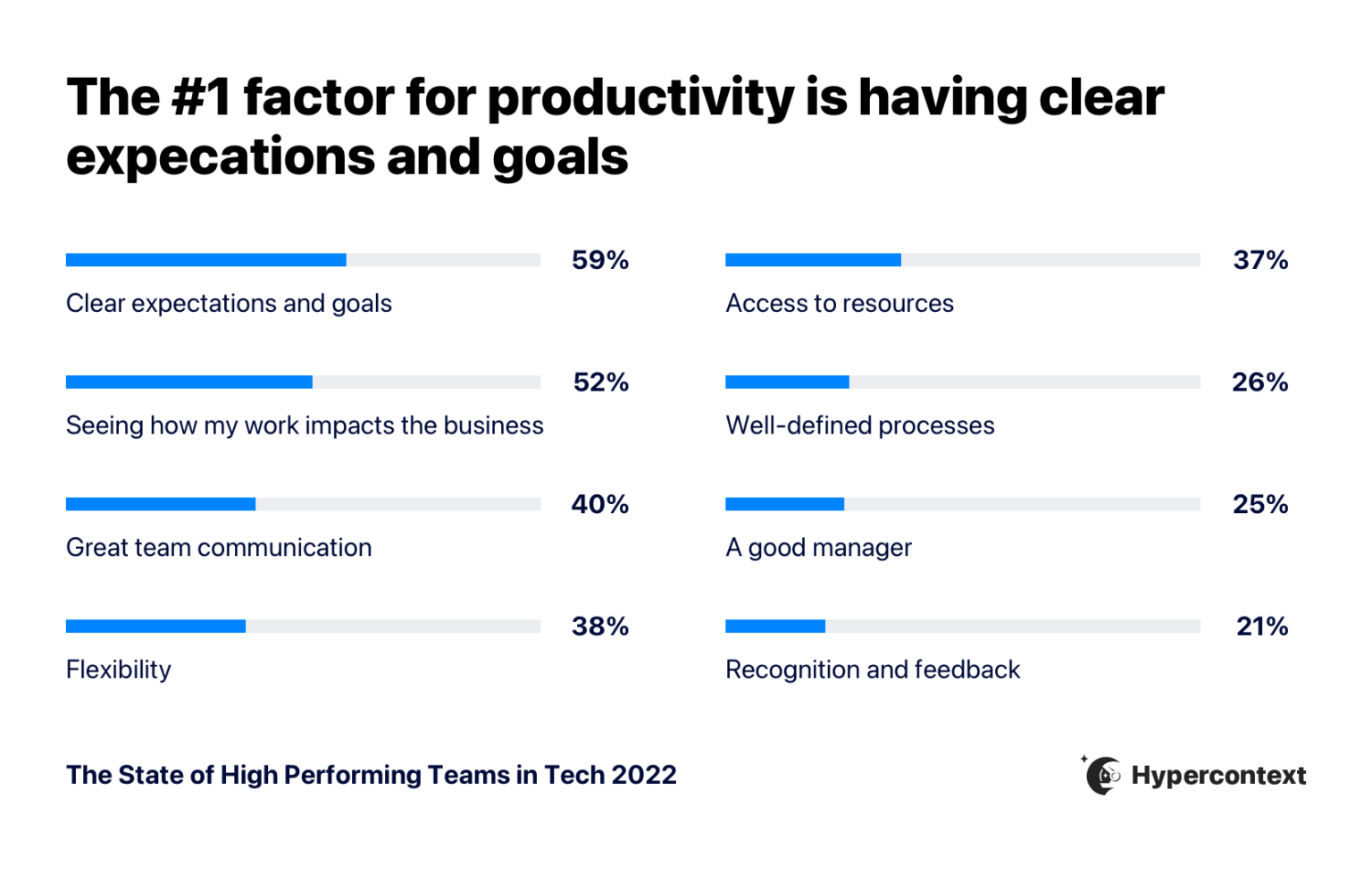
Image Source: Hypercontext
Most teams discover that 20 to 40 percent of their time goes toward support and administrative tasks. That represents a massive opportunity to reclaim productive hours without adding expensive full time roles.
Building a Delegation Framework That Actually Works
Delegation sounds simple in theory. In practice, many founders struggle to let go of tasks they have always handled themselves. The fear of losing control or receiving subpar work keeps them trapped in operational quicksand.
Successful delegation requires a systematic approach. Start by documenting processes for every task you want to hand off. Create step by step instructions with screenshots, templates, and examples of completed work. This documentation becomes the foundation for consistent quality regardless of who performs the task.
Next, establish clear communication protocols. Define how tasks will be assigned, what information needs to accompany each request, and how completed work should be delivered. Specify response time expectations and escalation procedures for questions or issues.
Finally, build feedback loops into your delegation system. Regular check ins allow you to catch problems early and provide guidance that improves performance over time. The goal is continuous improvement, not perfection from day one.
The Strategic Advantage of Virtual Support for SaaS Companies
Many SaaS companies are discovering that virtual assistants offer the perfect solution for scaling operations without the commitment of full time hires. This model provides flexibility that matches the unpredictable growth patterns of software businesses.
When you hire a virtual assistant from a managed service like Wing Assistant, you gain access to trained professionals who can handle a wide range of operational tasks. Unlike freelancers who require constant oversight, managed services provide quality assurance, backup coverage, and dedicated account management.
The economics make sense for SaaS companies at various stages. Early stage startups can access professional support at a fraction of the cost of a full time hire. The same principle applies to talent acquisition, where AI sourcing tools can help teams identify qualified candidates more efficiently without expanding internal recruiting resources. Growth stage companies can scale support up or down based on current needs without the complexity of hiring and firing employees.
Virtual assistants excel at the repetitive, process driven tasks that consume so much of a SaaS team's time. Email management, calendar coordination, data entry, research, and basic customer support all transfer well to virtual team members with proper training and documentation.
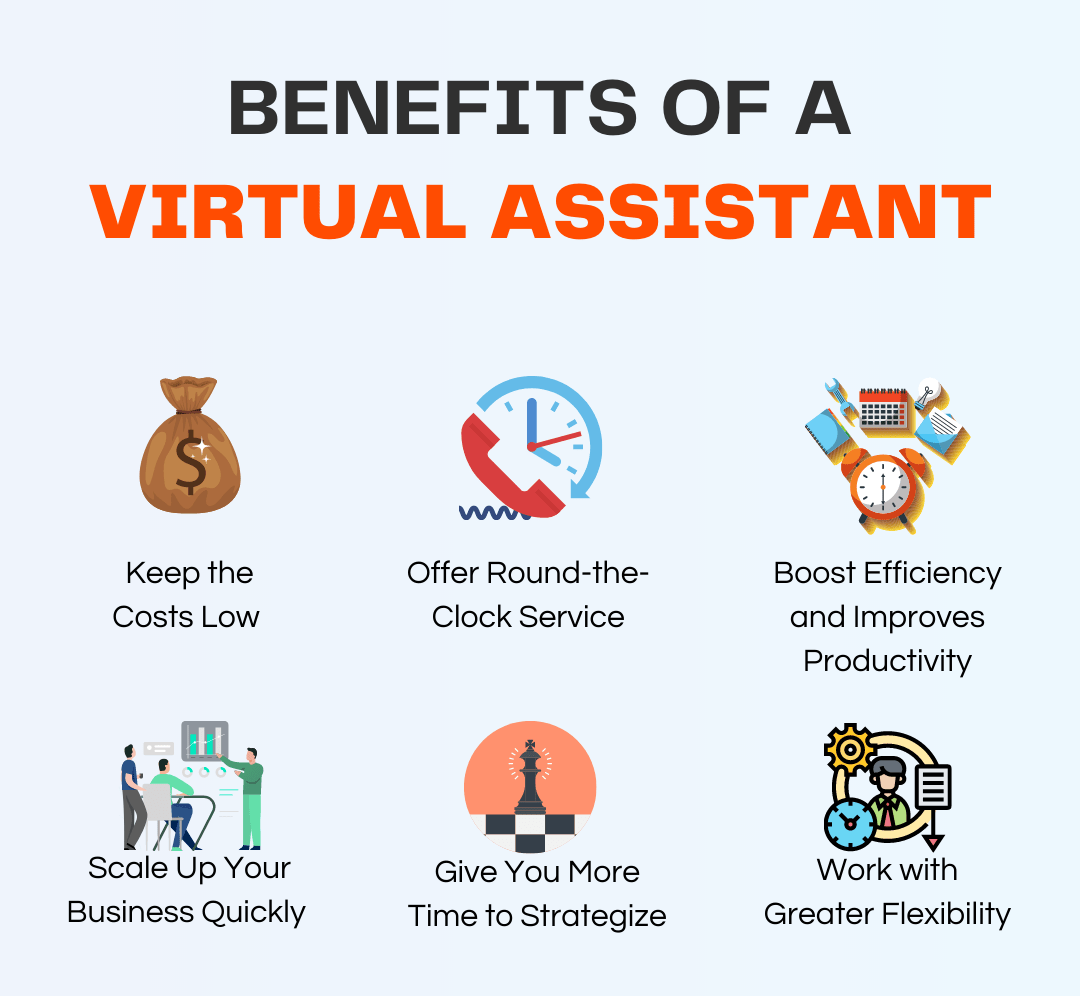
Image Source: Zirtual
Optimizing Your Marketing Operations
Digital marketing is one area where SaaS companies consistently struggle to maintain momentum. The sheer volume of channels, content formats, and campaign types overwhelms small teams trying to compete with well funded competitors.
Content marketing alone requires research, writing, editing, formatting, publishing, promotion, and performance tracking. Social media demands daily attention across multiple platforms. Paid advertising needs constant monitoring and optimization. Email marketing requires list management, sequence creation, and ongoing testing.
Smart SaaS marketers focus their energy on strategy and creative direction while delegating execution tasks. A virtual assistant can handle social media scheduling, content formatting, image sourcing, influencer outreach, and campaign reporting. This allows your marketing lead to concentrate on the high impact decisions that actually move metrics.
The key is maintaining quality control without micromanaging every task. Provide clear brand guidelines, content templates, and approval workflows. Review outputs regularly and provide specific feedback that improves future work. Over time, your virtual team members will internalize your standards and require less oversight.
Using a Unified Marketing Platform to Support a Lean Team
While virtual assistants help execute day-to-day marketing tasks, SaaS startups also need a structured system to manage campaigns, performance, and client or lead data without building a large internal marketing department.
This is where platforms like DashClicks can support a lean marketing operation by bringing multiple digital marketing functions into one centralized environment.
For SaaS startups and growing marketing teams, this kind of platform helps streamline both execution and visibility across channels.
How DashClicks Supports Scalable Digital Marketing?
DashClicks provides a combination of software and services that help startups operate like a larger marketing team without expanding headcount:
- White-Label Marketing Services: Outsource execution for SEO, PPC, content marketing, social media, and website development while maintaining full control over branding and client or stakeholder communication.
- Automated Client and Campaign Dashboards: Track campaign performance, leads, traffic, and conversions across channels in one place—eliminating the need to juggle multiple reporting tools.
- CRM and Lead Management: Organize inbound leads, sales pipelines, and customer data so marketing and sales teams stay aligned without manual tracking.
- Sales and Proposal Tools: Create and send branded proposals, manage prospects, and track deal status inside a single platform.
- Marketing Fulfillment and Task Management: Assign, monitor, and deliver marketing work without relying on scattered emails, spreadsheets, or disconnected tools.
By combining execution, reporting, and workflow management into one system, platforms like DashClicks help in SaaS startup marketing through professional-grade marketing operations while keeping teams lean, focused, and cost-efficient.
Streamlining Customer Success Without Sacrificing Quality
Customer retention drives SaaS profitability. But delivering excellent customer experiences becomes increasingly difficult as your user base grows. Support tickets multiply. Onboarding new customers consumes more time. Proactive outreach falls by the wayside.
The solution is not to hire a large customer success team before you can afford one. Instead, create systems that allow a small team to support more customers effectively.
Start by building a comprehensive knowledge base that answers common questions. Document solutions to frequent issues so customers can find answers without submitting tickets. Create onboarding sequences that guide new users through key features automatically.
Then use virtual support to handle tier one inquiries that follow predictable patterns. Password resets, basic how to questions, and billing inquiries can all be resolved by trained virtual assistants following documented procedures. This frees your customer success team to focus on complex issues, strategic accounts, and proactive relationship building.
Managing the Transition to Delegated Operations
Shifting from doing everything yourself to leading a distributed team requires new skills and mindsets. Many founders underestimate the adjustment period and become frustrated when results do not appear immediately.
Expect the first few weeks to feel slower, not faster. You will spend time training, answering questions, and reviewing work that you could have completed yourself in less time. This investment pays dividends once your virtual team members reach proficiency.
Resist the urge to take back tasks at the first sign of imperfection. Minor mistakes are part of the learning process. Focus on whether errors are decreasing over time and whether the overall quality meets acceptable standards. Perfect is the enemy of good when you are trying to scale.
Celebrate early wins to build momentum. When delegation works well, acknowledge the success and look for additional tasks to hand off. Small victories compound into significant operational improvements over time.
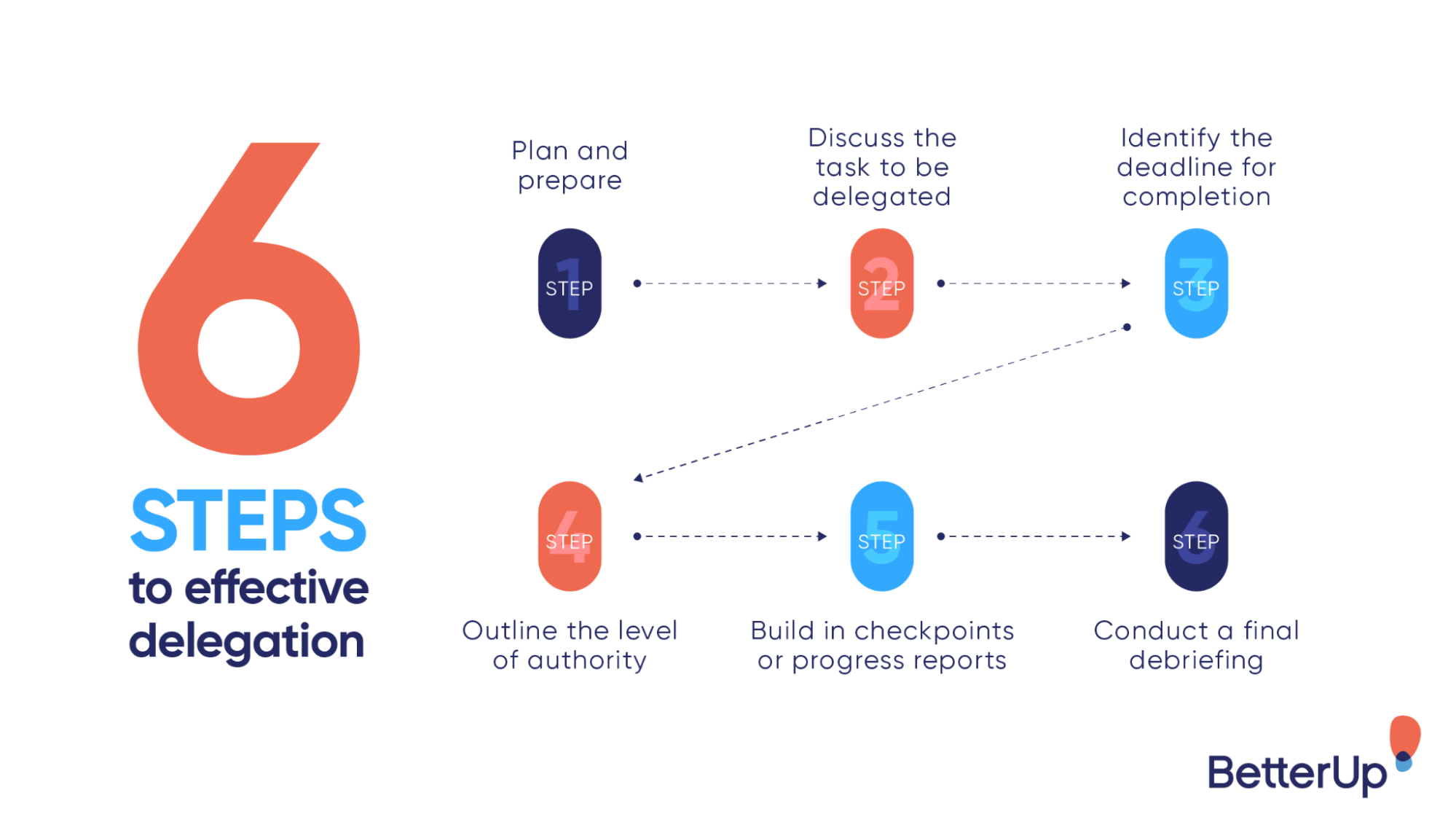
Image Source: BetterUp
Measuring the Impact on Your Business
Track metrics that demonstrate the value of your delegation investments. Hours saved per week provides a baseline measure of operational improvement. Calculate the dollar value of those hours based on what your team members could accomplish with that time.
Monitor leading indicators of business health. Are you shipping features faster? Publishing more content? Responding to customers more quickly? Closing more deals? These outcomes matter more than the delegation itself.
Compare your cost per task under the new model versus the old approach. Factor in not just direct costs but also the opportunity cost of having highly paid team members perform low leverage work. Most SaaS companies find that strategic delegation delivers positive ROI within the first few months.
Building for Long Term Scalability
The operational systems you build today determine how smoothly you can scale tomorrow. Companies that rely on heroic individual efforts eventually hit ceilings that require painful restructuring to overcome.
Invest in documentation, processes, and delegation infrastructure even when it feels like overhead. These foundations enable you to onboard new team members quickly, maintain quality as you grow, and adapt to changing business needs without starting from scratch.
Think of virtual support as a flexible layer that expands and contracts with your business. During product launches or funding rounds, increase support to handle the surge in activity. During quieter periods, scale back to optimize costs. This flexibility is impossible with traditional employment models.
Taking the First Step
Scaling a SaaS company is hard enough without drowning in operational tasks that distract from your core mission. The founders who succeed learn to protect their time and their team's focus by delegating everything that does not require their unique expertise.
Start small. Pick one or two tasks that consistently drain your productivity and experiment with handing them off. Document your processes, set clear expectations, and give the relationship time to develop. The results will likely convince you to delegate more.
The path to sustainable SaaS growth runs through operational efficiency. Build the systems and partnerships that allow your small team to accomplish what larger competitors struggle to achieve. Your future self will thank you for making the investment today.

How Agencies Can Use Online Training Platforms to Scale Teams
Scaling a digital agency is rarely slowed by a lack of demand. It’s slowed by execution. As new clients come in, agencies hire fast—bringing on account agency leads, specialists, freelancers, and white-label partners across different time zones. The challenge isn’t finding talent. It’s ensuring everyone delivers work the same way, at the same standard, without founders becoming the bottleneck.
Online training platforms help digital agencies solve this problem. They make it possible to onboard teams quickly, standardize processes, and maintain consistent service quality as operations scale. Instead of relying on ad-hoc training calls or scattered documentation, agencies can use centralized training systems to equip every contributor with the same knowledge, tools, and expectations—no matter where they work from.
This shift is changing how digital agencies train, operate, and grow at scale.
1. Flexible Learning Opportunities
For agencies managing remote teams, freelancers, and white-label partners, flexibility ensures training never slows client delivery.
With an online employee training platform, team members have the flexibility to choose the lesson time and location. This flexibility makes it easier for people to fit training into their work schedules. If team members have the flexibility to plan their requirements, they are more likely to complete the courses.
2. Consistent Knowledge Delivery
E-learning platforms are made to offer the same information to all team members. This means modules can be updated in minutes, with every team member pulled into the newest guidance. Consistency creates a mental model across various teams.
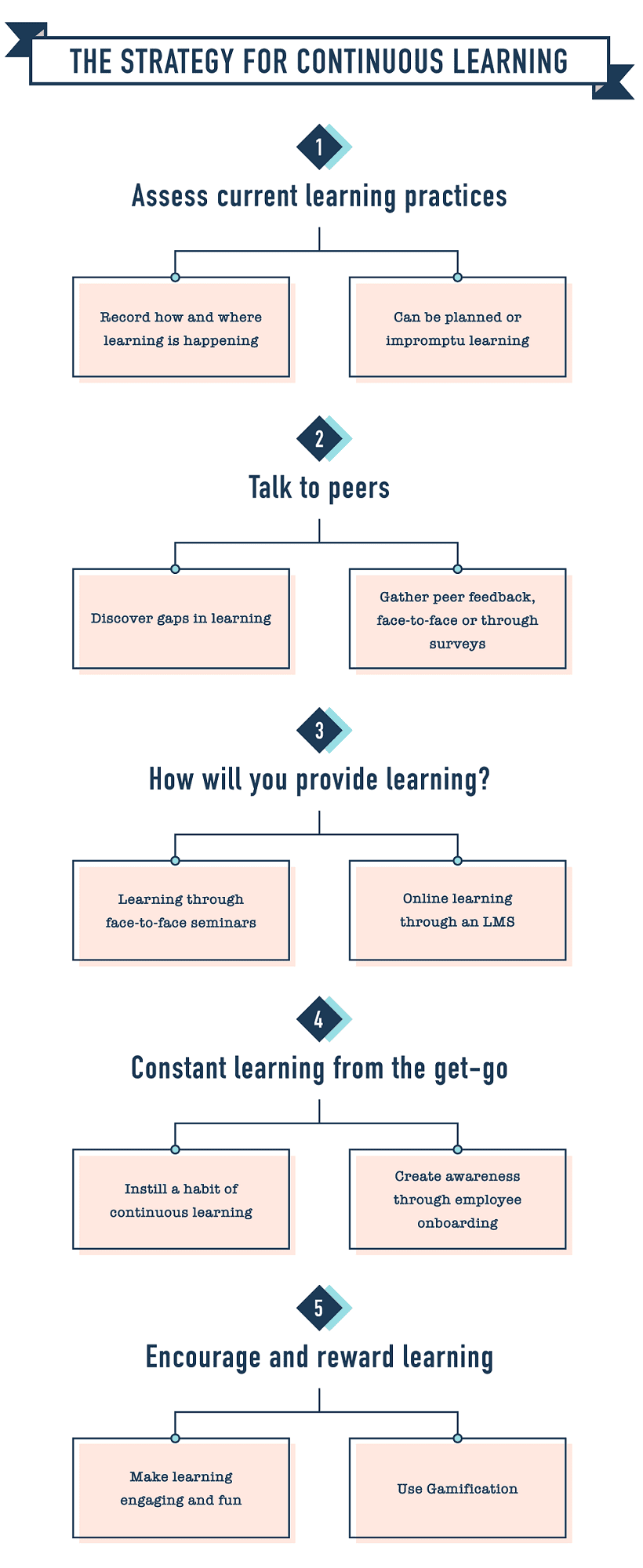
Image Source: LearnUpon
3. Personalized Learning Paths
Every team member learns differently. Choosing employee training software with customizable content allows agencies to tailor lessons to specific roles, skill levels, and client delivery requirements. Online training systems offer personalized paths based on the results of quizzes and other adaptive content. For team members handling technical responsibilities, agencies often pair these platforms with more structured options, such as IT training that covers areas like cybersecurity, cloud computing, and network infrastructure. These features assist team members in identifying areas that require improvement. This customized method keeps interest and eliminates irritation from repetitive content.
4. Tracking Progress and Measuring Success
With built-in analytics tools, agency leads can monitor participation and results. These insights reveal how effective your lessons are and where team members may have challenges. Data analysis is used to refine training strategies, coupled with progress tracking, to enhance accountability and celebrate achievements.
5. Cost-Effectiveness at Scale
Traditional training requires traveling, physically printed materials, and paying a fee for the instructor to teach. These costs are lower in the online world. By cutting out the logistical overhead involved in increasing access for more team members, large numbers of team members can access content with no additional logistical costs.
6. Supporting Collaboration and Community
Learning is not limited to solo environments. Discussion boards allow team members to seek advice and give it. Working together improves collaboration and enhances knowledge through common experiences.
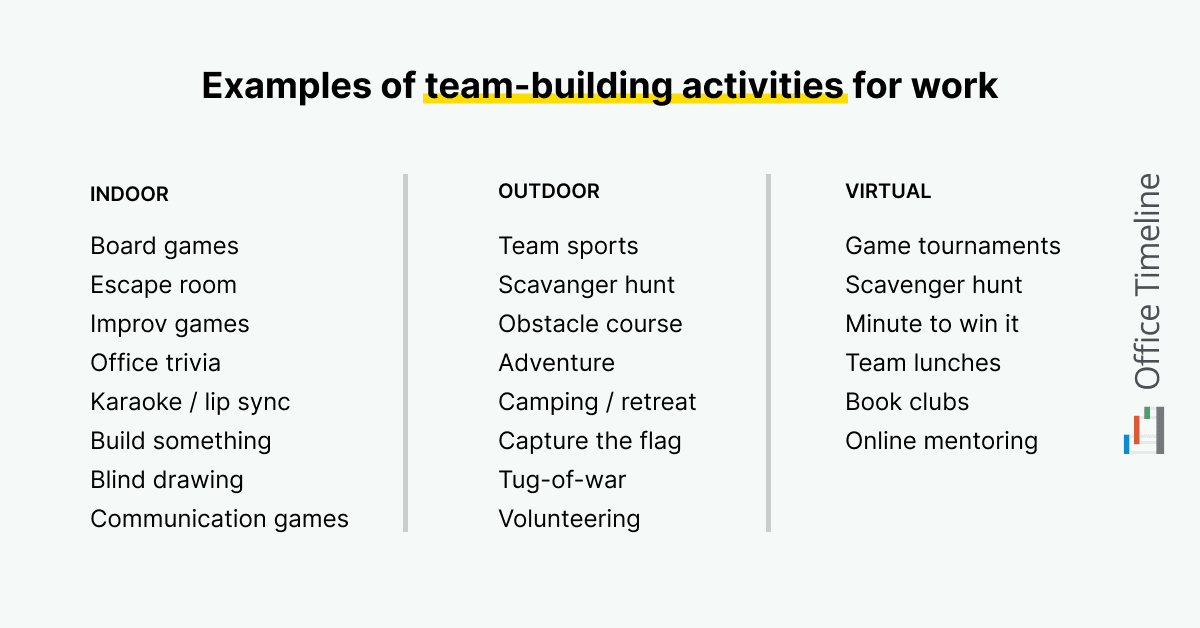
Image Source: OfficeTimeline
7. Adapting to Rapid Change
Regulations and best practices change often in many industries. New information is skillfully dispensed to team members without the waiting period for classes. Such agility helps agencies comply and compete.
Regulated verticals provide a clear example: agents can complete state‑approved real estate classes online for pre‑licensing and continuing education, showing how structured e‑learning keeps teams compliant at scale while minimizing disruption to daily work.
8. Overcoming Geographical Barriers
One of the complications of global digital agencies is accessing team members working remotely in different regions. Web-based platforms decrease distance as an obstacle. People working in different places can get connected, building a collaborative method for learning. It enables everyone to take part fully with multilingual support enabled.
For agencies working with remote teams, freelancers, and white-label partners across regions, online training removes location as a barrier to consistent delivery.
9. Encouraging Self-Motivation and Responsibility
With online training, you place the responsibility in the hands of each individual learner. It fosters independence: team members set their own pace. When a team member conducts self-directed learning, they build confidence and feel accomplished, too. Providing this level of autonomy typically results in both retention and application of knowledge being better.
10. Enhancing Engagement With Multimedia
Content with too much text is hard to digest. Interactive content like videos, simulations, and quizzes encourages engagement. To clarify complex concepts, you need to have better visuals and activities.
11. Supporting Long-Term Development
Digital agencies need to develop the ability to adapt to continuously changing challenges. As roles change or new skills become required, online courses can be updated accordingly. Constant availability of resources cultivates a culture of growth.
As agencies grow, training stops being an internal function and becomes an operational requirement. New hires, freelancers, and fulfillment partners must be enabled quickly without compromising service quality or client expectations. Online training platforms give agencies a repeatable way to onboard teams, reinforce processes, and maintain consistency as delivery scales across accounts, regions, and services.
Further Reading: How To Build a Winning Team in Your Agency
Why Training Consistency Matters for Client Retention?
As agencies scale, client retention depends less on creative ideas and more on consistent execution. Clients expect the same level of quality, communication, and results regardless of who is working on their account. Training consistency plays a critical role in meeting those expectations.
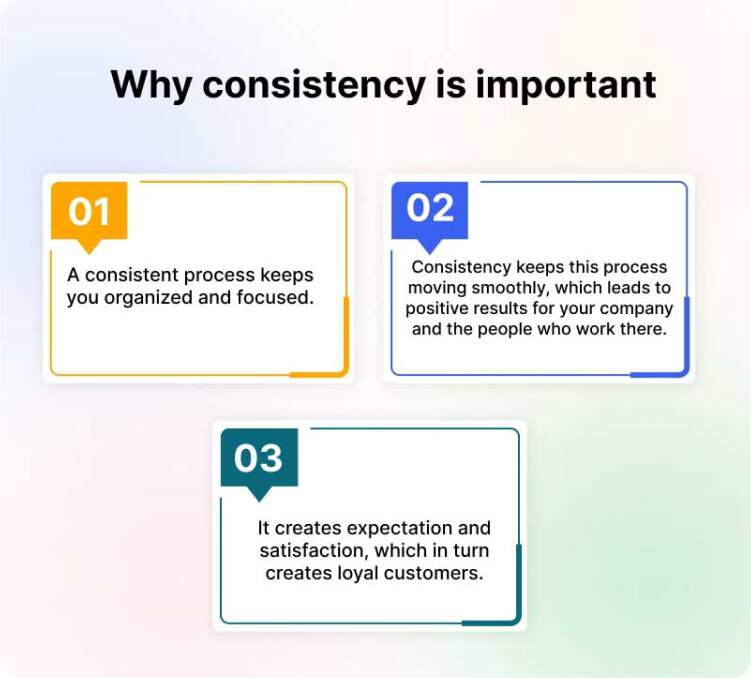
Image Source: REVE Chat
1. Predictable Delivery Builds Client Trust
Clients stay with agencies when execution feels reliable. Even strong strategies lose impact if delivery varies between team members, freelancers, or fulfillment partners. Consistency reassures clients that standards won’t change month to month and plays a key role in building long-term client trust.
2. Inconsistency Creates Uncertainty, Not Just Errors
When reports look different, timelines shift, or communication styles vary, clients begin to question reliability. These issues often appear small internally but signal instability externally, which weakens long-term confidence.
3. Standardized Training Aligns Service Execution
Consistent training ensures everyone follows the same workflows, tools, and quality benchmarks. This alignment reduces confusion, minimizes rework, and keeps delivery uniform across accounts and teams.
4. Onboarding Gaps Grow as Agencies Scale
As agencies hire quickly, training often becomes informal. New hires learn from different sources, freelancers rely on partial documentation, and partners interpret processes differently. Over time, these gaps compound and show up in client work.
5. Centralized Training Reduces Operational Friction
Online training platforms allow agencies to update processes in one place and push changes instantly. Teams stay aligned without repeated live sessions or manual follow-ups, which keeps execution stable even as services evolve.
6. Consistency Improves Efficiency and Accountability
When expectations are clear, teams make fewer mistakes and require less oversight. Agency leads spend less time fixing issues and more time focusing on the core principles of agency success, including scalable processes, accountability, and performance improvements.
7. Reliable Execution Strengthens Retention
Clients remain loyal when delivery feels professional and repeatable. Training consistency turns internal alignment into external trust, making retention a natural outcome rather than an ongoing challenge.
Addressing Security and Privacy Concerns
Digital agencies need to safeguard private data and sensitive client and internal data. But known training providers have secure platforms, and their privacy protocols are intact. Only frequent audits and system updates can keep trust intact. When data is responsibly managed, team members are more comfortable using online tools.
For agencies delivering services at scale, consistent execution matters as much as training. DashClicks supports this by helping agencies maintain operational consistency through white label fulfillment and scalable service delivery. When training systems and fulfillment processes work together, agencies can onboard teams faster, deliver predictable results for clients, and scale without operational friction.
Conclusion
Online training has transformed how teams learn at scale. The flexibility, consistency, and adaptability offered by these systems help agencies grow without losing control over service quality. By enabling faster onboarding, shared processes, and consistent execution across distributed teams, online training platforms allow agencies to overcome the operational challenges that come with scale while supporting personalized development.
As agencies expand their services and client base, structured training becomes a foundation for sustainable growth. Digital learning ensures teams stay aligned, capable, and prepared to deliver reliable outcomes—no matter how large or distributed the operation becomes.

No results found.
Please try different keywords.
Get Started with
DashClicks Today
Get found online, convert leads faster, generate more revenue, and improve your reputation with our all-in-one platform.
.svg)
Unlimited Sub-Accounts
Unlimited Users
All Apps
All Features
White-Labeled
Active Community
Mobile App
Live Support
100+ Tutorials
Unlimited Sub-Accounts
Unlimited Users
All Apps
All Features
White-Labeled
Active Community
Mobile App
Live Support
100+ Tutorials
Unlimited Sub-Accounts
Unlimited Users
All Apps
All Features
White-Labeled
Active Community
Mobile App
Live Support
100+ Tutorials


